Lychee Slicer 8.0.0
- Major update
- Lychee Slicer
After three years of development and months of beta testing, Lychee Slicer 8.0 is yours. Lychee Slicer 8.0 is a complete application rebuild that brings more speed and control to model preparation. At its core are a new framework and our own rendering engine, developed in-house at Lychee for faster processing, improved responsiveness and lower memory use. A new Auto-Orientation algorithm joins editable hollowing and internal supports. With fixes for long-standing issues, this is our biggest release yet.
New 🎉
New engine developed by Lychee
New application foundation: Lychee Slicer 8 replaces Electron with a framework developed in-house by Lychee. It combines Chromium Embedded 150 for the interface with our own Vulkan engine for window rendering and compositing, providing the foundation for faster performance and a more responsive interface.
New tools and features
New! Assembly Keys: You can now create assembly keys to solve alignment issues, ensure perfect fit, and secure your printed parts with precision..
New! Auto-Orientation algorithm: minimises overhanging area and returns the same orientation for the same model. Also available in the Free version.
New! Repair algorithm: rewritten for more reliable fixes on complex or damaged meshes.
Editable hollowing voxels: added a tube brush that fills cavities behind the surface, with apply-on-release and selection modes. The cursor displays its footprint in millimetres.
Internal auto-supports: added support generation inside hollowed cavities and beneath internal overhangs.
Support scope: added Interior, Exterior and combined generation, plus Interior and Interior Pillar presets.
Performance profiles: added Low (~30 FPS), Medium (~60 FPS) and High (~120 FPS) interface settings.
Progress feedback: added progress bars for .lys saving and hollowing, a startup splash screen and a startup error screen.
Version details: added exact build information in the about section.
Import and export: added multi-object 3MF Production Extension support, Goo v5 support for the Anycubic Jupiter 2, and LGS support.
Performance test 🚀
Spend less time waiting for supports and more time preparing your models. Improvements also reduce rendering work and memory use in complex scenes.

Benchmark results: measured improvements
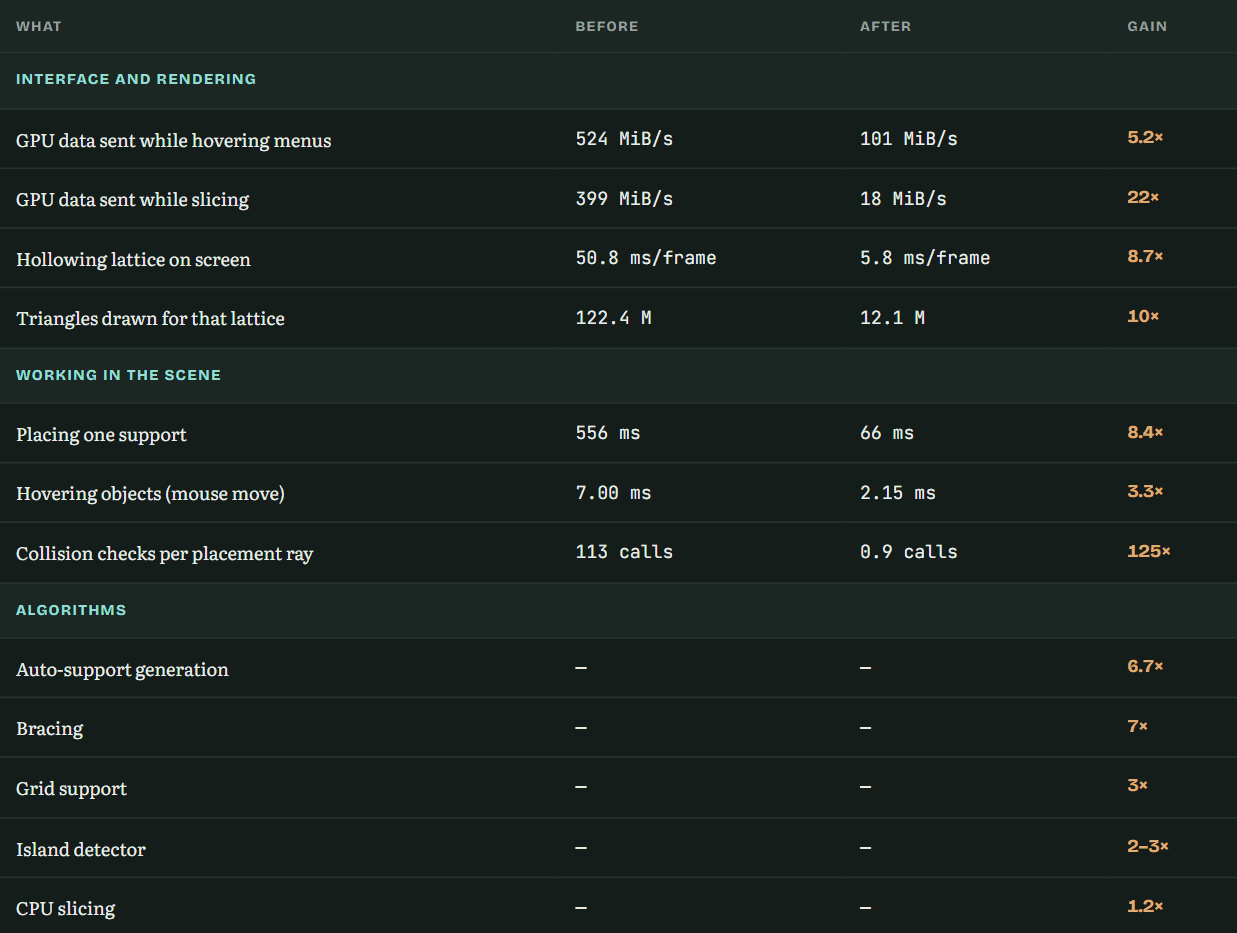
Measurements from tested scenes; results vary with your hardware and project. Rendering and interaction figures were measured on final 8.0 builds; algorithm gains were recorded across development. GPU figures measure data transfer during the operation. Reductions are rounded from the values shown. “—” indicates that absolute timings are not available.
More responsive scene editing
Undo and redo: only changed scene data is shared between views, reducing repeated processing in large, heavily supported scenes.
Background recalculation: heavy support updates run with a progress bar so the interface remains responsive.
Efficient rendering: the interface redraws when needed and transfers only changed screen rows. On Windows and macOS, interface compositing uses the GPU without an intermediate CPU copy.
Native support processing: Path to Ground, Grid and FDM support creation now run in the C++ geometry engine.
Lower memory use
Sliced output: compressed layers are streamed to disk as they are generated. The entire output file no longer needs to remain in RAM before writing.
Hollowing: grid data dropped from approximately 118 MB to 6 MB on a tested dense model. This reduction applies to the hollowing grid, rather than total application memory.
Interface buffers: unused buffers expire and are released; the full pool clears under memory pressure. The source identifies particular benefits on 16 GB systems with shared CPU/GPU memory, without quantifying total RAM savings.
Out-of-memory handling: the application displays an error message instead of crashing.
Changed🔧
Copy and paste: replaced Duplicate; copies preserve suction cups, hollowing voxels and minima previously lost with Alt+D.
Hollowing display: improved lattice lighting with per-face ambient occlusion for clearer cavity inspection.
Licence seats: increased from two to three.
.prz export: enabled fast slicing.
Resin volume calculation: derives layer counting directly from encoded images for more efficient, exact calculations.
Connectivity: rebuilt native TCP, UDP multicast discovery, Wi-Fi scanning and serial communication as a foundation for future printer connectivity work.
Windows integration: added an embedded app icon across Windows, system-theme title bars, and accurate version and publisher information in file properties.
Application links: registered lychee:// links on all three platforms; links are passed to the running instance instead of opening a second copy.
Fixed 🐛
Includes fixes for issues present in Lychee Slicer 7.
Model preparation
Auto-Arrange: Fixed an infinite loop in the packing algorithm that could freeze the application with certain combinations of plates and objects.
Support generation and painting: Fixed crashes when an action hit a hollowing shell or drain hole and returned a face from a different mesh. Mesh face references are now validated before processing.
Projection Supports: Fixed interface crashes when the action processed hidden objects. Processing is now limited to visible objects.
Auto-support generation: Fixed hangs on some geometry. Volume checks beneath a support point now detect additional overhanging regions that were previously missed.
Planar cut: Fixed crashes on certain shapes, including simple icosahedrons.
Mesh repair: Fixed crashes when welding nearby vertices.
Mirroring: Fixed red holes appearing on models after mirroring.
Suction cup detection: Fixed missed cavities, including those in heads and beaks.
Suction cup placement: Corrected offsets on affected placements.
Island and minima detection: Fixed the threshold filter so it correctly discards single-pixel artefacts.
Island support detection: Corrected slice-to-slice difference calculations on affected models.
Tags: Are now keep after support recalculation.
Projects, imports and application stability
Opening .lys projects: Fixed loading freezing without a message when geometry files were missing. Lychee now attempts auto-backup recovery or clearly reports what is missing.
Changing printers in multi-plate projects: Fixed objects shifting on the second and later plates after a printer change. Stored plate positions are now resynchronised.
Copy, paste and duplicate: Fixed cases where copied objects were placed outside the build plate.
STL import: Removed duplicate file parsing and duplicate registration of the same object in the geometry pool, reducing unnecessary processing and memory use.
Multi-object 3MF import: Fixed failures opening affected files that use the 3MF Production Extension.
Linux licence seats: Corrected machine identification so reinstalling Lychee no longer consumes an additional licence seat.
Export formats and printer connectivity
cxdlp v4, GR1 and PW0: Fixed output encoder issues in these formats.
Wi-Fi camera feeds: Restored camera feeds for printers using the latest Chitu boards, matching the functionality available in Lychee 7.